| Product Dimensions | 33D x 44.5W x 13.5H Centimeters |
|---|---|
| Controller Type | Windows, Windows 10 |
| Maximum Media Size | 4.0"x6.0" till A4 / Letter / Legal / A5 / B5 |
| Power Consumption | 0.6 Watts |
| Included Components | Printer |
| Print media | Glossy photo paper |
| Scanner Type | Flatbed |
| Max Input Sheet Capacity | 100 |
| Max Copy Speed (Black and White) | 1 ppm |
| Display Type | LCD |
| Compatible Devices | PC, Smartphones |
| Maximum Colour Print Resolution | 4800 x 1200 dpi |
| Sheet Size | A4,A5,B5,Letter,Legal,10.16 x 15.24cm,12.7 x 17.78cm,20.32x 25.4cm,Envelopes (DL, COM10),Square (12.7x12.7cm),Business Card,Custom size (width 55 - 215.9mm, length 89 - 676mm |
| Maximum Black and White Print Resolution | 4800 dpi |
| Dual-sided printing | No |
| Wattage | 11 Watts |
| Max copy resolution colour | 4800 x 1200 dpi |
| Max copy resolution black-white | 600 x 1200 dpi |
| Duplex | Manual |
| Hardware Interface | USB 2.0 |
| Ink Colour | Black |
| Resolution | 4800 x 1200 |
| Additional Printer functions | Copy, Scan |
| Compatible cartridge | GI-790 (Black), GI-790 (Cyan, Magenta, Yellow) Ink Bottles |
| Model Series | PIXMA |
| Manufacturer | Avail free installation on this model from Canon : Contact_us on: [1800 180 3366 ][1800 208 3366] Timings: 8:30am-5:30pm post receipt of product to book and schedule free installation and support, Canon Inc. |
| Form Factor | All-in-One |
| Notebook Display Technology | LCD Diplay 1.2 Inch Mono |
| Item model number | 2313C018 |
| Connectivity Type | Wi-Fi |
| Operating System | Windows,Windows 10,Windows 8 |
| Are Batteries Included | No |
| Manufacturer | Canon Inc. |
| Imported By | Canon India Pvt Limited.214-218, 2nd floor, Narain Manzil, Barakhamba Road, Connaught Place, New Delhi-110001, India |
| Item Weight | 6 kg |
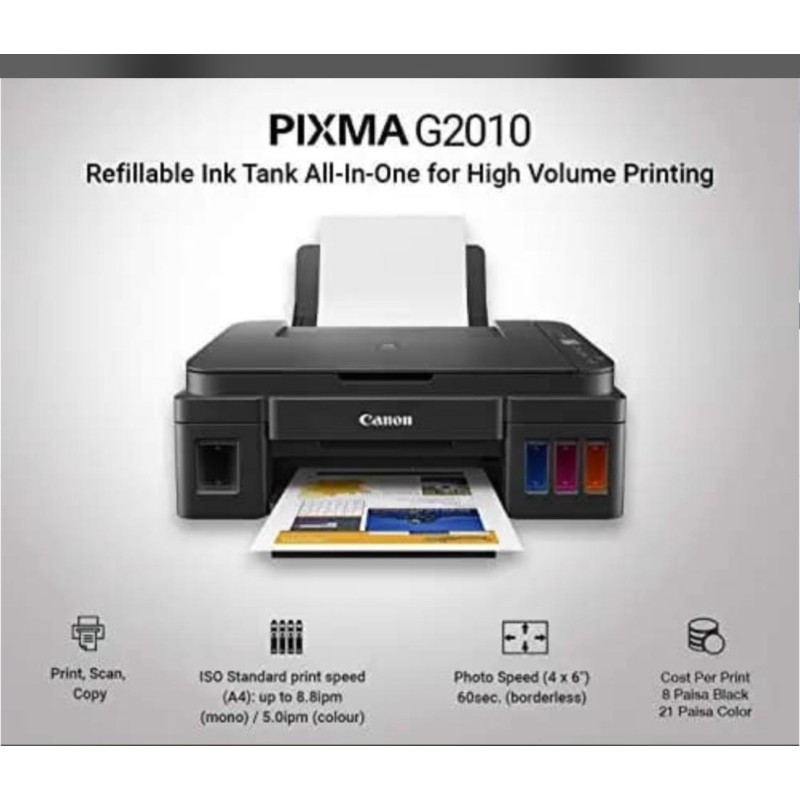
Canon PIXMA MegaTank G2010 All-in-One Ink Tank Colour Printer (Black)
₹15,999.00
Categories
Cart
Account
Search
Recent View
Go to Top
All Categories
×
- Adapter
- Barcode Printers
- Barcode Scanner
- Bio-Metrics
- Branded Desktops
- Cabinates
- Cables & Accessories
- Cables & Connectors
- CCTV
- Cleaning kit
- Cooler
- Custom PC
- External Storage
- Gaming Computers
- Graphics Card (GPU)
- HDMi
- Headsets
- Internal Storage
- Keyboard
- Keyboard & Mouse
- Laptop Coolers
- Laptops
- Measuring And Layout Tools
- Memory Cards
- Memory(RAM)
- Monitor
- Motherboard
- Mouse
- Networking
- Pen drive
- Printers
- Processor
- Projector
- Scanner
- SMPS
- Softwares
- Speakers
- Thermal Grease
- Toners & iNKS
- Uncategorized
- USB Hubs
- USB-C Devices
- WebCams
Shopping Cart
×
Your shopping cart is empty!
Search
×
Recent View Products
×
Has no content to show !
Product Description
About this item
- Printer type: Inktank ; Functions: Print, Scan, Copy ; Printer output: Colour ; Connectivity: USB ; Scanner: Yes ; Scanner resolution: 600 x1200 dpi
- OS Compatibility: Windows 10, Windows 8.1, Windows 7 SP1 ; Mobile connectivity: No ; Hardware Interface: USB 2.0 Hi-Speed ; Enlarge/reduce option: No ; Duplex: No
- Maximum Print Speed (color): 5.0 ipm, Maximum Print Speed (Monochrome):8.8 ipm ; Print cost Monochrome: Rs 0.10 ; Print cost color: Rs 0.24 ; Maximum Print Resolution (Color): 4800x1200 dpi, Maximum Print Resolution(Monochrome): 4800x1200 dpi
- Page size : A4, A5, B5, Letter, Legal, 10.16 x 15.24cm, 12.7 x 17.78cm, 20.32x 25.4cm, Envelopes (DL, COM10), Square (12.7x12.7cm), Business Card, Custom size (width 55 - 215.9mm, length 89 - 676mm ; Max paper thickness: 64 to 275 GSM ; Maximum Input Sheet Capacity: 100 sheets (A4) ; Compatible ink: GI790 Cyan, Magenta, Yellow, Black ; Additional Printer Function: Borderless Printing ; Power wattage of printer: OFF: 0.2W, Standby (scanning lamp is off) (USB connection to PC): 0.6W, Standby (all ports connected, scanning lamp is off): 0.6W, Copying: 9W
- Special Features: Borderless Printing, High volume printing; Ideal Usage: Home, Home Office ; Included Components: Printer, Power Cord, USB cable, Instruction Manual, 1 set of GI 790 Cyan, Magenta, Yellow and Black ink bottles
- Warranty - 1 year warranty from the date of purchase.Use only genuine Canon ink. Using counterfeit ink will harm your printer as well as render your warranty void
Product information